> For the complete documentation index, see [llms.txt](https://docs.acho.io/llms.txt). Markdown versions of documentation pages are available by appending `.md` to page URLs; this page is available as [Markdown](https://docs.acho.io/app-builder/app-construction/elements/web-elements/badge.md).
# Badge
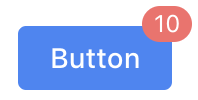
A number or status mark over an element. Badges are typically used for buttons or icons.
By default, a badge has 2 parts:
1. A section to insert another element.
2. The badge indicator, which is a red [Text](/app-builder/app-construction/elements/web-elements/text.md) element.
For example, this is what it will look like when you drag a button into a badge element.
## Properties
No properties. See [Tooltip](/app-builder/app-construction/elements/tooltip.md) for tooltip configurations.
## Supported Events
No supported events.
## Supported Actions
**Set Data:** Change element data. See [Data Store](/app-builder/app-construction/data-store.md).
**Set Loading:** Set loading animation. See [Set loading animations](/app-builder/popular-use-cases/set-loading-animations.md).
{% hint style="info" %}
Visit [Interactions](/app-builder/app-construction/interactions.md) for more on events and actions.
{% endhint %}